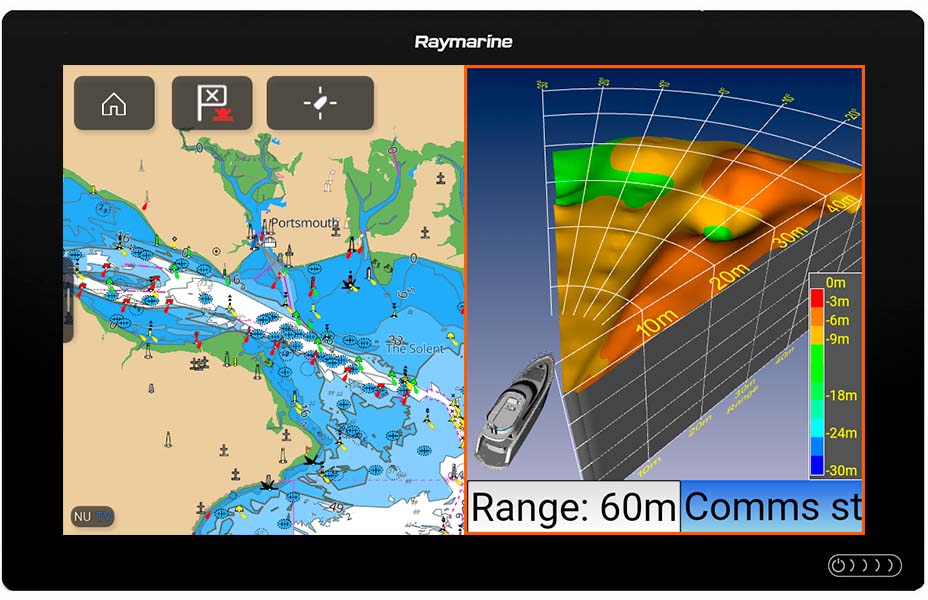
The FLS 3D Forward Looking Sonar is one of the best proven Forward Looking Sonars. The FLS 3D displays a 3-dimensional representation of the underwater scene ahead of the boat. The seabed terrain and potential hazards are shown, for the first time, withunparalleled realism.
The FLS 3D will connect to any third party display via its HDMI and VGA video output. Simply connect the video cable to the displays video input and you are up and running. The FLS 3D also has direct integration to Raymarine Axiom Displays and is easily connected to the raynet via an RJ45 to Raynet cable.
FLS 3D
The FLS 3D scans the seabed in a 60 degrees horizontal plane and 90 degrees in the vertical plane. The forward range is up to 200m and 100m depth. The FLS 3D is equipped with a new technology called Average Forward Depth. The Average Forward Depth is the average depth of the water ahead, based on sonar readings. knowing the average depth you are sailing torwards is a vital tool for navigating compared to the normal depth sounder that only gives you the depth underneath your vessel.
The importance of Forward Looking Sonar Technology is the depth to range ratio. The FLS 3D has a staggering 20 x depth ratio! This means that you will see 100 meters ahead with only 5 meters of water underneath your boat. This is the highest ratio in Forward Looking Sonar Technology!
The FLS 3D Forward Looking Sonar has the ground breaking technology of Real-Time Forward Looking Sonar. The display updates every one second so the captain will always be updated on the seabed terrain and potential hazards ahead.
FLS 3D – 30 Degree
The FLS 3D – 30 Degree Forward Looking Sonar is a ground breaking single transducer Forward Looking Sonar allowing all boatowners access to a commercial level Forward Looking Sonar. The FLS 3D – 30 Degree displays a 3D visualization of the underwater seabed ahead of the boat giving the captain ease of mind when navigating poorly or uncharted water.
The FLS 3D – 30 Degree will connect to any third party display via its HDMI and VGA video output. Simply connect the video cable to the displays video input and you are up and running.
.png)